How I built Scout, the AI assistant that runs my project intake
Scout has the first conversation about a new project, then hands me a brief. What it’s for, what it’s built from, and how I taught it to talk.
When someone wants to talk about a project, the first step is usually finding a time for a call. I wanted something better than that, so I built Scout. Scout is an AI assistant with one job: the first conversation about a new project. I send someone a private link and Scout says hello, asks good questions, and fills in a brief while they talk. They check the brief, fix anything that isn’t right, and send it to me to read.

What it’s for
Three things, in this order:
- Convenience. People can start whenever it suits them, at 10 p.m. on a Sunday if they want. They can stop partway and come back later. Nothing reaches me until they press send.
- Outcome. By the time it reaches me, I know what their business does, who their customers are, what isn’t working, and why now. I can hit the ground running instead of spending the first call catching up or sending emails back and forth to find a time for a first call.
- Assistance. A lot of people know something’s wrong before they know what they need. Scout’s job is to help potential clients find the words for it and help define the problem we want to solve.
I built it so clients could tell me about a project on their own time. Nobody has to find a slot that works for my schedule and theirs. It was also a fun experiment for me: I wanted to learn how AI models and chatbots are trained.
The workflow
Here’s every step, from the link I send to the proposal I write. The middle part repeats for every message until the brief is ready.
Scout’s intake, start to finish
- MeI decide
- ThemThe person telling me about their project
- CodeA fixed program decides, the same way every time
- AIScout uses its judgment
Before
Step 1: Send a private linkMe
One command makes a link for one person, with their name and, if I know it, the service they asked about. The link expires on its own.
Every message, until the brief is ready
Step 2: Say what’s on their mindThem
They type, tap a suggested answer, or pick an example card. Anyone who’d rather not chat can fill in the brief as a form.
Step 3: Check the messageCode
Is the link still good and under its limits? Card numbers, social security numbers, and anything after “password” are removed before it’s stored.
Step 4: Reply, and fill in the briefAI
Scout reads its instructions, the brief so far, and the conversation. It writes the brief down as it goes, and can show example cards or suggest answers.
Step 5: Check the replyCode
Anything with a price or a promise is thrown away and asked for again. Only a checked reply is saved and shown.
The wrap-up
Step 6: Call the brief readyAI
When it has what I need, Scout says so. Code refuses until four things are in: the business name, an email, what they need, and what a good result looks like.
Step 7: Check it, and send itThem
They see the whole brief as a form, change anything, and send it. Or delete everything with one button.
Step 8: Email me the briefCode
The brief arrives in my inbox with the whole conversation under it. They get a short thank-you note from Scout.
After
Step 9: Read it and replyMe
I read every brief myself, email a question or two if I need to, then send a proposal with what I’d build and the price.
Four kinds of worker show up in that list: me, the person I invited, code, and the AI. The AI has two jobs: holding the conversation, and judging when the brief is ready. Everything that has to be right every time, like the price check, the limits, and the email, is plain code.
That split is the same lesson I learned automating my eBay listings. The AI is asked not to name prices. The code makes sure it doesn’t.
What it looks like
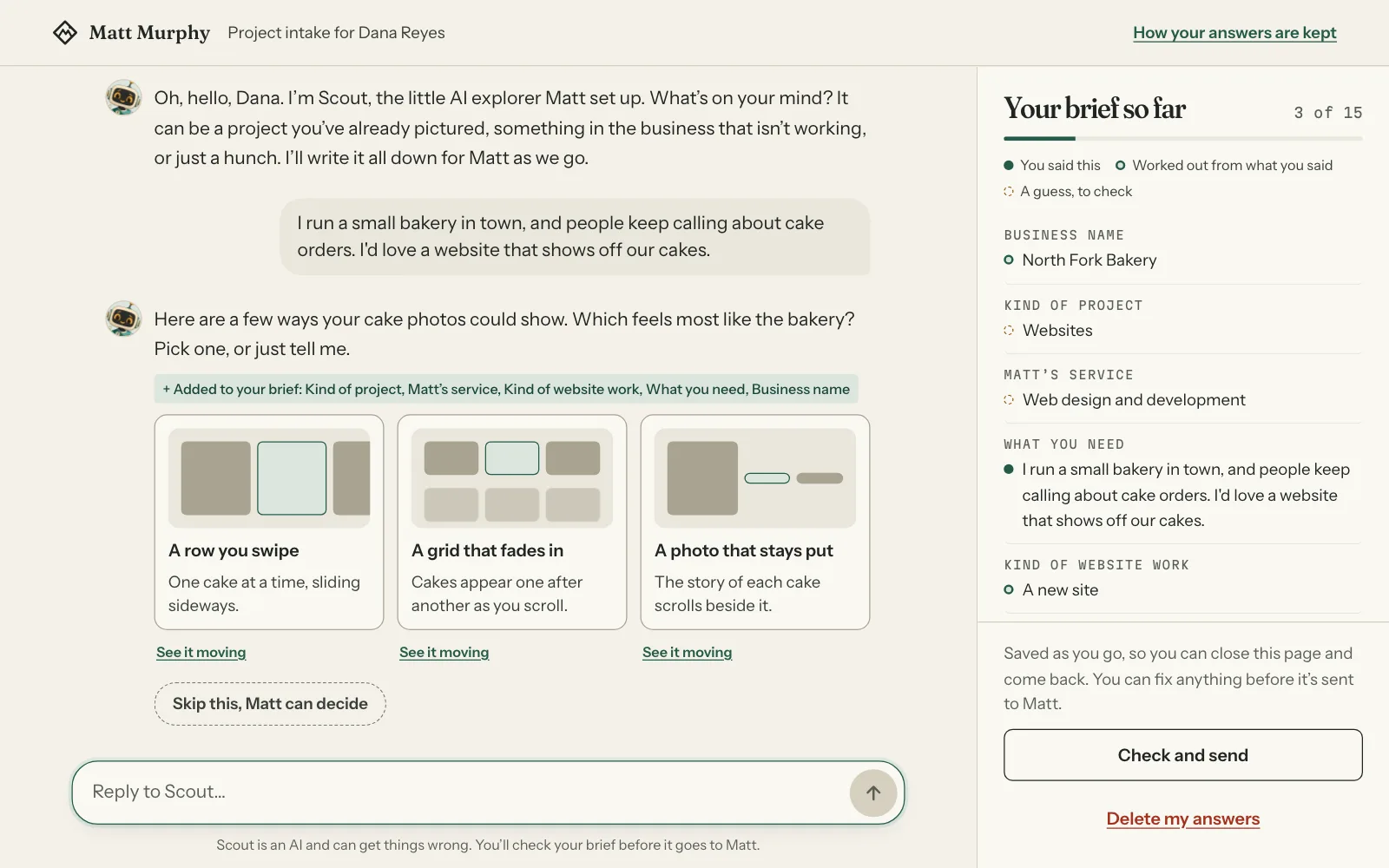
Here’s the demo version. The business is a made-up bakery, and the AI is a scripted stand-in, so nothing in the picture is a real person or a real conversation.
What makes it different
Most chatbots are there to answer questions. Scout is there to ask them, and a few features make that work.
It shows design ideas instead of describing them. Words like “clean” and “modern” mean something different to everyone. So when a choice is easier to see than to describe, Scout puts two or three example cards right in the conversation. Each one has “See it moving,” which opens the real effect, working, on top of the chat:
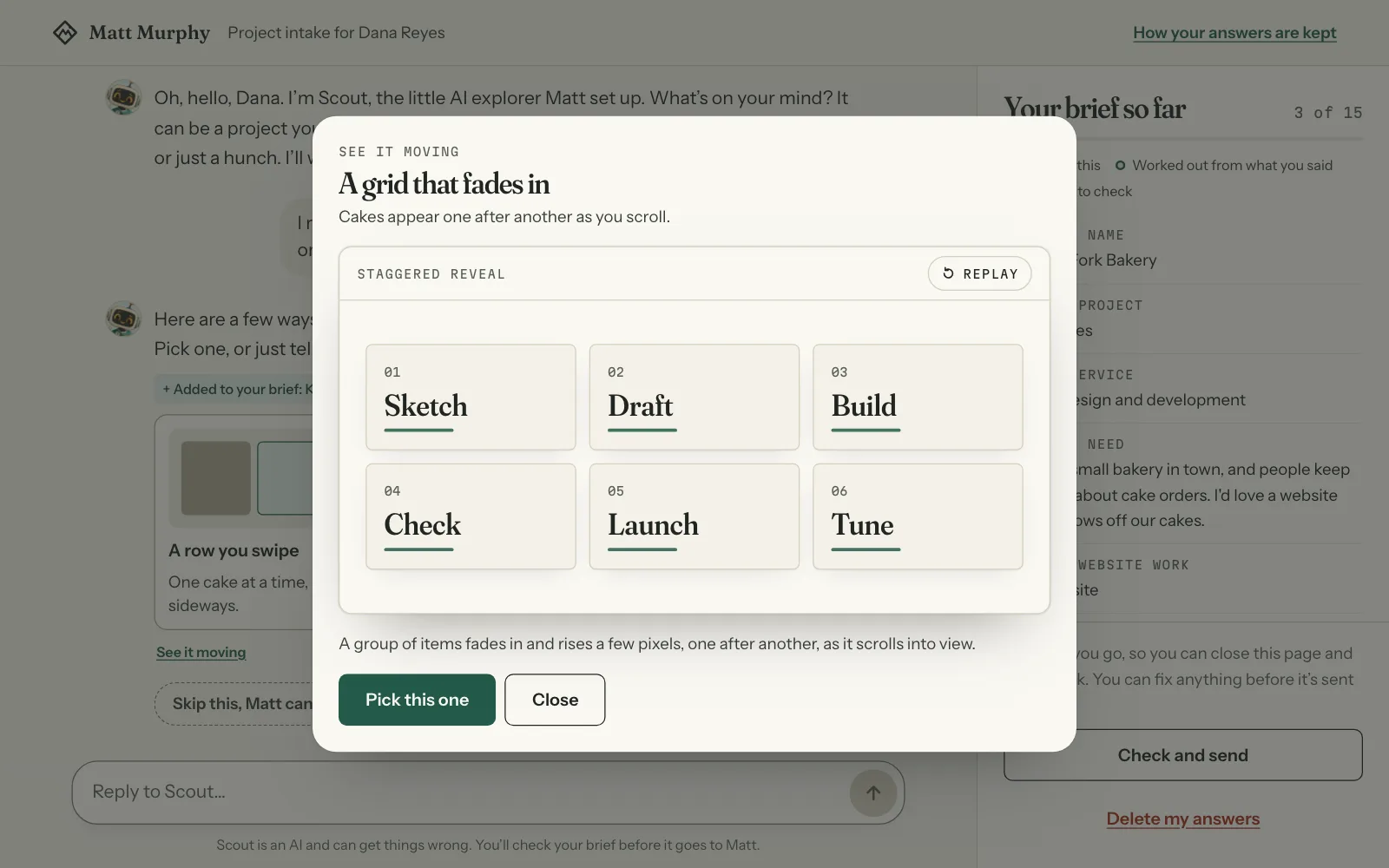
The cards come from a library of 42 effects I built for my own sites, so what people pick is something I can actually make. Whatever they pick goes into the brief, and there’s always a “Skip this, Matt can decide” button for anyone who’d rather leave the look to me.
The brief is never hidden. It fills in beside the conversation as they talk, written in their own first person. Each answer gets a dot: solid if they said it, ringed if Scout worked it out from what they said, and dashed if it’s a guess they should check.
Suggested answers. When a question has a few likely answers, Scout offers them as buttons. People can tap one, pick several and send them together, or ignore them and type. Now and then one of the buttons is a related service, like a business email alongside a new website. It’s offered, never pushed.
It knows what I do, in my words. Scout describes my services the way my site does, and it explains how working together goes: the brief, then my questions, then a proposal.
No dead ends. Someone who’d rather not chat can fill in the brief as a form. A request outside what I do gets written down in their words, not turned away. And if the AI is ever switched off, the page opens as a form, so a link I’ve sent always works.
I get the whole story. The brief arrives by email with the full conversation under it. I can see what they said, and how Scout did.
How I designed the workflow
The starting point was a good first call: what I’d want to know by the end of it. The hard part was getting there without it feeling like a form. A few choices shaped everything else:
- A conversation first, a form second. The form is always there, but it’s the backup.
- It should feel like the chat apps people already use. The people I invite judge my work by this page, so it had to feel finished on a phone and on a computer.
- The person stays in charge. Nothing reaches me until they check the brief and press send, and they can delete everything at any point.
- One engine, many businesses. The conversation logic is its own package, and my business is one settings file: the questions, the rules, and the services. Another business could plug in its own.
What it’s built from
Scout lives in its own small app, separate from this site.
| Part | What it does |
|---|---|
| Next.js (another site), on Vercel (another site) | The app: the page, the conversation, and the brief |
| Claude Sonnet 5.5 (another site), from Anthropic | The AI that writes Scout’s replies |
| The Vercel AI SDK (another site) | Connects the app to the AI and its tools |
| Postgres (another site) | Keeps the brief and the written record of the conversation |
| Resend (another site) | Emails me the brief when they press send |
| My effects library | The 42 live effects behind the example cards |
Giving Scout Instructions
“Prompt” makes it sound like one clever sentence. Scout’s standing instructions are about 9,600 words, and here’s how they split up:
What Scout reads before every reply
- 4,733 words What I offer: 13 services, in my site’s own words
- 2,893 How to hold the conversation, the rules, and the brief’s 43 fields
- 1,017 The 42 website effects it can show
- 966 Its personality, in my words
Half of it is the services I offer, and that half isn’t written by hand. It’s generated from the service pages on this site. So Scout describes each service the way the site does, and when I change a service page, Scout’s instructions change with it. The generator never reads a price, so there isn’t one for Scout to repeat.
Because those 9,600 words are the same on every turn, they’re cached (another site). Re-reading cached instructions costs a tenth of reading them fresh. Each link has a spending cap, and without caching a long conversation would hit it around message 20.
Setting Scout’s Personality
Scout runs on the Claude API as it comes. What I did to dial it in is closer to onboarding a new hire: write down the job, the rules, and the voice, then watch it work and fix what I see through testing and iteration.
The rules, in code
Some things can’t be left to a personality file, because a personality file can be edited. Scout’s rules live in code, where an edit can’t switch them off:
- Scout says it’s an AI and requires that a written record is kept.
- It never names a price, a timeline, or a promise.
- It never turns anyone away. If someone asks for something I don’t do, Scout writes it down in their words and carries on.
- Scout’s tools can fill in the brief and put cards and buttons on their screen, and nothing else.
The personality, in my words
Scout’s personality is a file called SCOUT.md that I wrote and can edit. Every conversation gets it, word for word. It describes who Scout is, how it sounds, and, just as useful, how it doesn’t. Two pieces of it:
Honest. If I don’t know, I say so. No imaginary facts wearing convincing hats.
Make people feel welcome, help them get somewhere, then get out of the way.
The file has a list of lines that sound right and a list of lines that don’t, and it’s the second list that does the bulk of the work. “Great question! I’d be happy to help with that!” is on it. So is asking two questions at once.
The checks
The third layer is code that catches what slips through anyway. Here’s one real line from the price check:
/[$€£]/, // any currency sign at all
If a currency sign shows up anywhere in a reply, the reply doesn’t. There are eight patterns like that one, covering “5k”, “from 200”, “per hour”, and the rest. This is how I make sure, in code, that Scout never mentions a price.
What the first day of testing changed
The first version went live on October 9. On October 10, I ran test conversations as if I were a customer, and fixed what I found the same day. Most of these came from reading the transcripts:
- It felt like a form. One test went website, domain, logo, timing, email, in that order. Now Scout learns the business first, follows the thread when an answer has something in it, keeps replies to two to four sentences, and asks one question at a time.
- It ran long. A good test took 22 messages and half an hour. Now Scout aims for about 14 messages, and starts steering toward the end about two-thirds of the way in.
- It said it was an AI three times. The page and its first message already say so. Now it says it once, and again only if someone asks.
- It wrapped up without the business’s name. Now the brief can’t be marked ready until four things are in: the business name, an email, what they need, and what a good result looks like.
- Its tool calls leaked into the chat once. A reply showed the raw markup of a tool call instead of words. Now any reply with that markup is never shown or saved.
- Money. I decided Scout should never ask about budget at all. It asks how big a project they’re picturing instead, and I price it in my proposal.
Most of those weren’t the AI getting something wrong, they were instructions I hadn’t written yet.
What stays mine
Scout handles the first conversation. It doesn’t handle the relationship.
- The price. Scout never names one. I do, in a proposal, after I’ve read the brief.
- The reply. Scout never speaks for me or says I’ll do anything except read the brief and reply by email.
- The read. Every brief comes with the whole conversation underneath it, so I can see how Scout did, not just what it wrote down.
And the person stays in charge of their own words. They see the brief the whole time, edit it before it’s sent, and can delete everything with one button. There are no cookies, no analytics, and nothing stored in their browser.
What’s next
Scout can only type for now. The pieces for talking out loud are built, and switched off.
If you’d like something like Scout for your own business, an assistant that knows your services and hands you a clean brief, that’s the kind of thing I build under an AI assistant for your team. Or tell me what you’d want yours to do, and I’ll send Scout to talk through it with you.